Instant messaging is great. People often don't respond to email or check it regularly, but like a phone call IM is more interactive without the commitment level of a phone call. There are other enhancements like voice, video, and file transfer - but for me the most valuable feature is presence information (you listening to me out-of-office notification).
Here's the problem though - one bad apple spoils the whole bunch. How hard is it to just set an auto-away on your IM client. If you walk away from the computer it sets you to away when you are... yeah, away. People do not do this, they end up being always available, thus the creation of a new protocol... the YT protocol.
Once one person starts doing yt? everyone starts. It spreads like an infectious disease - or like that idiotic habit of flipping up your wind shield wipers at the slightest threat of a flurry. This renders the great presence information in IM nearly useless. For those fortunate enough to have an immunity to this disease, it stands for "you there?". I can understand abbreviating long phrases, like bbiab or lmfao - but really, you can't type out "you there?".
I have a new group in my IM clients now called Broken. Anyone who types yt to me in an IM session is instantly moved to this list which will always remain collapsed. I wish all IM protocols had the "warn" feature that AIM has and I had a script to automatically warn them as a slight scarlet letter for those bad apples. I encourage everyone to pay it forward by blocking or hiding all buddies that choose to spread this. Thank you.

Showing posts with label Dorkness. Show all posts
Showing posts with label Dorkness. Show all posts
Thursday, May 14, 2009

Tuesday, February 24, 2009
Monday, December 15, 2008
Rockbox - I hated it, now I like it

On iTunes I can be listening to a podcast or an audio book then pause and sync with my iPod. When I hop into the car and hit play it continues where I left off. If I plug in my iPod when I get to work and I have iTunes there I can hit play and continue right where I left off. I want to have the latest podcasts handy at all times, and it would be nice to have some music on my digital media player as well. Syncing with iTunes mostly satisfies this goal by allowing me to select what playlists to sync, including smart playlists (which can search by relative published dates like "this week"). The last I checked, iTunes only supports auto-fill on the iPod shuffle which has always confused me. I want to have my latest podcasts, and then don't waste the rest of the space... fill it up with some random music - it's better than leaving it empty.
Portable media players are built to be sold, which sometimes coincides with usability and customer satisfaction, sometimes not. People use these things when they are away from their computers - running, gardening, doing housework, or driving. If a player makes me stop running or makes me pull off my garden gloves it fails to follow it's primary purpose - play what I want and get out of the way. From what I can tell, most people don't listen to podcasts or audio books. They load the music, shuffle, and never touch the thing outside of an occasional skip forward. When you listen to an audio book or podcast you need to pause when you get a phone call or talk to the toll booth dude - music you just let it go. Sometimes you miss something and need to scrub backwards. Often you need to fast forward past commercials. Podcast listeners also update their player daily, something that music-only users are unlikely to do. These features do not seem unreasonable, but most players perform badly with these requirements, and the iPod is no exception.
This is all fine, except I don't use iTunes. My computers these days are filled with Linux goodness. Linux distributions normally include Rhythmbox, Banshee, or Amarok depending on which way you swing. I don't have much experience with Amarok, but as of today Rhythmbox and Banshee both are unreliable for use with a portable media device. Yes, you can get them to work once, twice, or five times in a row, but that sixth time is a big fat failboat. They are sooooo close to being good, but in the meantime I end up not listening to my podcasts in the car.
The iPod is designed to work with iTunes and specifically attempts to lock out third-party clients - even though Apple doesn't make a client for my platform. MTP devices as I understand are more open to different clients - but that still has not led to a reliable experience for my MTP device.
Banshee supposedly worked well syncing MTP devices, so I scored this Sansa c240 for $20 in hopes of being able to reliably listen to podcasts in my car again. Nope, it was no more reliable than the iPod - it'd flake out every few sync attempts. The firmware on this bad boy was beyond horrible. Each time the device starts the volume is at 50% - no matter where it was last time. To turn up the volume you must find a song, play it, then press the volume up button about ten times (can't hold it) to turn it up all the way. On the plus side, at least it will remember where you were in a song if you happen to navigate back to the exact same track after booting. Oh booting - that's another thing. It took about ten seconds to boot this thing up which is a long time to sit there waiting to find a song so you can turn up the volume. The default theme made it near impossible to see what was selected, and scrubbing through a track was super slow and difficult.
Enter rockbox, an open source firmware for a number of media players that is loaded with features. I had tried rockbox in the past on my iPod Mini, but was turned off by the unnecessary complexity of the system. This weekend though I put the latest rockbox on my Sansa, and I am rather impressed. After messing with the settings I now have a player that boots up much more quickly and resumes my podcast exactly where I was last. I solved by syncing problem quite simply - by not doing it. The Sansa is a mass storage device so I can just copy things to it manually - but once I get off my butt I'm going to just set up rsync to automatically make sure I have only the freshest of podcasts loaded when I plug it in. Rockbox can build it's database on startup, which so far has been working quite well. With the iPod or Sansa syncing with Banshee it would always rebuild the music database, which blew away the bookmark on what I was listening to - and I spend half the drive home trying to scrub through an hour-long podcast trying to get to where I left off.
The games and applications with Rockbox are quite impressive running on this craptastic Sansa. I particularly like bubbles, which appears to be a rebuild of Frozen Bubble, a simple Linux puzzle game. Once I get my podcasts syncing correctly I'll probably write up a script to do an automatic playlist generation. I'd like to have a playlist each day that sorts my podcasts by published date so I can just play the top item to hear the latest content.
Wednesday, February 6, 2008
dotmac, not .Mac

Apple has a service called .mac that fanboys love and unwitting consumers are convinced to buy when they buy a new mac. To me, I've never thought of buying this $100/year service that includes a mac.com email address, 10GB of web storage cutely named iDisk, web hosting, and some synchronization and backup tools. I've got an email and web server / webdav server already, and $100/year seems like a lot of bread for some sync capabilities. They also have something called Back to My Mac which is effectively just VNC access to your home machine without having to forward a port through your home firewall.
There is a great young project out there appropriately named Dotmac for folks with their own server that don't mind fighting through some incomplete documentation. $0/year is a good price for those sync features I'd say. I've got it running and I am pretty impressed. It is running happily on my home server and just works. Stacey and I have a nice shared address book now and I've got backups for things like my keychain, calendars, and dashboard widgets. Not too shabby.
Monday, November 12, 2007
The Reasons are Fading
There is a whole process I go through when I install a new OS X system. I thought I'd run through some of the programs I install or tweaks I make to make the system serve me. Many of these things are much easier on Linux... it kinda makes me wonder.
office suite - OS X does not come with an office suite. For the most part I can get away with Google Docs, but sometimes you just need a rich client. For years I've been praying for Aqua port of OpenOffice, which someday will exist. Until then, I can run X11. iWork may or may not be good enough - don't know. MS Office is still a PPC app, so my Intel mac uses rosetta to run it (slow with a memory bloat bonus).
media management - iTunes is great for music. I love coverflow and smart playlists. It still angers me though. iTunes breaks DAAP sharing - ensuring that only iTunes can share with iTunes. Yet another dirty little lock-in. Podcast management sorta stinks - but I can mostly solve this with smart playlists. Movie and TV show management doesn't work well. I either need special applescripts and mov reference files to make iTunes somewhat of a usable movie tool for my existing media, or just buy everything fresh and new from the iTunes store. I'll never use iTunes music store because it's expensive and DRM laden. On Linux - I can use Magnatune and Jamendo on Rhythmbox or Banshee. Oh, and DAAP works in both Rhythmbox and Banshee as well.
instant messaging - The A/V features of iChat are top notch, but mostly I chat with text. I want a single client that does Yahoo, GTalk, and AIM and puts them in a single buddy list - iChat doesn't do that - so I'd use Adium anyway. Pidgin, the built-in IM client on Ubuntu does.
browsing - I use Firefox over Safari. I love my plugins, like Adblock plus and FoxyProxy. Safari is fast, but that doesn't matter much - the Firefox addons almost guarantee that I can browse how I want.
media playback - Quicktime is okay I guess. The interface is a bit bulky for me and of course to make it work with most media I have or find I need to install the Perian codec pack. I then use a program called NicePlayer because the interface is cleaner. MPlayerOSX is quite a bit better if you want to go away from the Quicktime backend - hmm, isn't MPlayer called "the movie player for Linux".
address book - Stacey and I both use a mac and since I'm too cheap to pay $100/year for .mac just for Address Book syncing I use a ghetto fabulous rsync script to the same end. I tried syncing with Plaxo, and that was a let down. Address book is quite cool with smart contact lists - and it ties in with Mail.app and iChat quite well... its just too bad I don't use either of those applications anymore. On Linux rumor has it that Evolution can be used with Conduit to sync contacts and calendars all over the place.
mail - Like the rest of the tech savvy world, I've moved to gmail. I battled with Mail.app and my own IMAP server for years. I still have the IMAP server and Mail.app, although for the life of me I can't figure out why I would want to use them. On OS X I go to Google and install their notifier application so I know when new mail arrives. On Linux the Mail Notification program that is built right in can notify me of new mail in my gmail inbox. Hmm.
calendar - I loved iCal like no other app... that is before Google Calendar came out. Come on - it'll SMS notify me of events and I never have to sync? Add to that private URLs and easy sharing of the same calendar. Game, set, match. On Linux Evolution has just about feature parity with iCal, but the cool thing is that when I click on the little clock in the toolbar I can get a quick glance of what is going on today, cool. Evolution also can connect to my Exchange server at work so I can keep both my work and home life in one calendar. Oh, and I can share that back with Google calendar.
vpn - I have to install the Cisco VPN client on OS X to connect to work. I can use vpnc right from the application repositories in Ubuntu. It's pretty easy to set up right through Network Manager... sometimes.
sync - Another thing I loved about the mac was its ability to sync my calendars and contacts with my mobile phone. Well I have a crappy Windows Mobile phone now, so I'm kinda out of luck. I paid for Missing Sync to solve this problem. Now I moved to Leopard and I am screwed. I'm not paying again.
photo management - Each time a new version of iLife comes out I obtain (through questionable sources) this new must-have version. Most folks use Flickr, PicassaWeb, Smugmug or the like - I'm no exception. Of course that's not built in... but if you pay for .mac you can do photocasting. I am a Flickr Pro user. I paid for a plugin for iPhoto that lets me export to Flickr. The latest version of iPhoto was just plain broken for me under Tiger. Actually not just broken, it caused my machine to be quite crashy. Now it seems fine with Leopard, but in any case its a slow memory hog. Hmm, F-Spot is less flashy but has export to flickr, picassaweb, smugmug, and 23hq (whatever that is) built right in - loopy. Oh, and it doesn't crash my computer.
advanced photo editing - I normally secure a version of Adobe CS3. These are great programs chock full of features that I have no idea how to use. Photoshop CS3 is $400 or more. I'm not sure the price of the whole suite, but I'm sure words line-of-credit would come into play if I were to obtain an legitimate copy. The Gimp and Inkscape do much more than I'll ever be able to figure out, but they are a little more rough around the edges. I can run these on OS X, but of course need to install X11. What a kludge.
mouse - To keep my setup all maclike and pretty I bought a bluetooth mighty mouse. Of course, Apple has a different idea of mouse acceleration than any other manufacturer - so I had to seek out third party tweak tools to make me happy with the mouse. Hmm, the mouse works in Ubuntu without too much trouble and with familiar acceleration curves.
dorky stuff - The new Leopard tabbed terminal is great, but under Tiger I used iTerm because it was just better. I'm not sure why they disable anti-aliasing by default. Gnome-terminal is pretty solid as well.
I was super excited when MacFuse came out - a port of the FUSE userspace file system implementation for OS X. It lets me use things like sshfs to mount up my server. Oh, I can do this right out of the box with GnomeVFS and Nautilus - don't even need FUSE. If I do need FUSE though, there it is, built right into my Linux distro.
application integration - I've tried going with an all Apple solution for a long time (everything but .mac) because when you drink the kool aid, life can be good. The tables are starting to turn though. Yes, iChat ties into Address Book contact details, ties into Calendar with the birthdays, ties into Mail.app email addresses ties back into iChat. That's great. I don't use iChat, Mail.app, and just use iCal a little. Apple is falling on its face when it comes to innovative ways of tying their OS into web apps. In Gnome pidgin ties into evolution (contacts) ties into evolution (calendar) ties into evolution (mail) ties into system clock. I'd say Linux is just slightly better for me, since I actually use Evolution at work. I'd need a doctorate to figure out how to sync my Windows Mobile piece of shit.
I don't really find setting these things up to be particularly enjoyable. I'd like a system that I can install, fill in a username and password, and be done with it. If I can then "just work" I'm a happy camper. I'm just noticing that over the years I am doing more and more to make OS X work how I want to. In that time Ubuntu, Gnome, and Linux in general has pressed forward. I can see a move to all Linux in the not too distant future for me.
office suite - OS X does not come with an office suite. For the most part I can get away with Google Docs, but sometimes you just need a rich client. For years I've been praying for Aqua port of OpenOffice, which someday will exist. Until then, I can run X11. iWork may or may not be good enough - don't know. MS Office is still a PPC app, so my Intel mac uses rosetta to run it (slow with a memory bloat bonus).
media management - iTunes is great for music. I love coverflow and smart playlists. It still angers me though. iTunes breaks DAAP sharing - ensuring that only iTunes can share with iTunes. Yet another dirty little lock-in. Podcast management sorta stinks - but I can mostly solve this with smart playlists. Movie and TV show management doesn't work well. I either need special applescripts and mov reference files to make iTunes somewhat of a usable movie tool for my existing media, or just buy everything fresh and new from the iTunes store. I'll never use iTunes music store because it's expensive and DRM laden. On Linux - I can use Magnatune and Jamendo on Rhythmbox or Banshee. Oh, and DAAP works in both Rhythmbox and Banshee as well.
instant messaging - The A/V features of iChat are top notch, but mostly I chat with text. I want a single client that does Yahoo, GTalk, and AIM and puts them in a single buddy list - iChat doesn't do that - so I'd use Adium anyway. Pidgin, the built-in IM client on Ubuntu does.
browsing - I use Firefox over Safari. I love my plugins, like Adblock plus and FoxyProxy. Safari is fast, but that doesn't matter much - the Firefox addons almost guarantee that I can browse how I want.
media playback - Quicktime is okay I guess. The interface is a bit bulky for me and of course to make it work with most media I have or find I need to install the Perian codec pack. I then use a program called NicePlayer because the interface is cleaner. MPlayerOSX is quite a bit better if you want to go away from the Quicktime backend - hmm, isn't MPlayer called "the movie player for Linux".
address book - Stacey and I both use a mac and since I'm too cheap to pay $100/year for .mac just for Address Book syncing I use a ghetto fabulous rsync script to the same end. I tried syncing with Plaxo, and that was a let down. Address book is quite cool with smart contact lists - and it ties in with Mail.app and iChat quite well... its just too bad I don't use either of those applications anymore. On Linux rumor has it that Evolution can be used with Conduit to sync contacts and calendars all over the place.
mail - Like the rest of the tech savvy world, I've moved to gmail. I battled with Mail.app and my own IMAP server for years. I still have the IMAP server and Mail.app, although for the life of me I can't figure out why I would want to use them. On OS X I go to Google and install their notifier application so I know when new mail arrives. On Linux the Mail Notification program that is built right in can notify me of new mail in my gmail inbox. Hmm.
calendar - I loved iCal like no other app... that is before Google Calendar came out. Come on - it'll SMS notify me of events and I never have to sync? Add to that private URLs and easy sharing of the same calendar. Game, set, match. On Linux Evolution has just about feature parity with iCal, but the cool thing is that when I click on the little clock in the toolbar I can get a quick glance of what is going on today, cool. Evolution also can connect to my Exchange server at work so I can keep both my work and home life in one calendar. Oh, and I can share that back with Google calendar.
vpn - I have to install the Cisco VPN client on OS X to connect to work. I can use vpnc right from the application repositories in Ubuntu. It's pretty easy to set up right through Network Manager... sometimes.
sync - Another thing I loved about the mac was its ability to sync my calendars and contacts with my mobile phone. Well I have a crappy Windows Mobile phone now, so I'm kinda out of luck. I paid for Missing Sync to solve this problem. Now I moved to Leopard and I am screwed. I'm not paying again.
photo management - Each time a new version of iLife comes out I obtain (through questionable sources) this new must-have version. Most folks use Flickr, PicassaWeb, Smugmug or the like - I'm no exception. Of course that's not built in... but if you pay for .mac you can do photocasting. I am a Flickr Pro user. I paid for a plugin for iPhoto that lets me export to Flickr. The latest version of iPhoto was just plain broken for me under Tiger. Actually not just broken, it caused my machine to be quite crashy. Now it seems fine with Leopard, but in any case its a slow memory hog. Hmm, F-Spot is less flashy but has export to flickr, picassaweb, smugmug, and 23hq (whatever that is) built right in - loopy. Oh, and it doesn't crash my computer.
advanced photo editing - I normally secure a version of Adobe CS3. These are great programs chock full of features that I have no idea how to use. Photoshop CS3 is $400 or more. I'm not sure the price of the whole suite, but I'm sure words line-of-credit would come into play if I were to obtain an legitimate copy. The Gimp and Inkscape do much more than I'll ever be able to figure out, but they are a little more rough around the edges. I can run these on OS X, but of course need to install X11. What a kludge.
mouse - To keep my setup all maclike and pretty I bought a bluetooth mighty mouse. Of course, Apple has a different idea of mouse acceleration than any other manufacturer - so I had to seek out third party tweak tools to make me happy with the mouse. Hmm, the mouse works in Ubuntu without too much trouble and with familiar acceleration curves.
dorky stuff - The new Leopard tabbed terminal is great, but under Tiger I used iTerm because it was just better. I'm not sure why they disable anti-aliasing by default. Gnome-terminal is pretty solid as well.
I was super excited when MacFuse came out - a port of the FUSE userspace file system implementation for OS X. It lets me use things like sshfs to mount up my server. Oh, I can do this right out of the box with GnomeVFS and Nautilus - don't even need FUSE. If I do need FUSE though, there it is, built right into my Linux distro.
application integration - I've tried going with an all Apple solution for a long time (everything but .mac) because when you drink the kool aid, life can be good. The tables are starting to turn though. Yes, iChat ties into Address Book contact details, ties into Calendar with the birthdays, ties into Mail.app email addresses ties back into iChat. That's great. I don't use iChat, Mail.app, and just use iCal a little. Apple is falling on its face when it comes to innovative ways of tying their OS into web apps. In Gnome pidgin ties into evolution (contacts) ties into evolution (calendar) ties into evolution (mail) ties into system clock. I'd say Linux is just slightly better for me, since I actually use Evolution at work. I'd need a doctorate to figure out how to sync my Windows Mobile piece of shit.
I don't really find setting these things up to be particularly enjoyable. I'd like a system that I can install, fill in a username and password, and be done with it. If I can then "just work" I'm a happy camper. I'm just noticing that over the years I am doing more and more to make OS X work how I want to. In that time Ubuntu, Gnome, and Linux in general has pressed forward. I can see a move to all Linux in the not too distant future for me.
Tuesday, July 3, 2007
Hi, My Name is Jonathan Schwartz
The CEO of Sun is the official winner of the Muppethouse "CEOs That Deserve Wedgies" award. Congrats Mr. Schwartz.

Monday, April 30, 2007
09 F9 11 02 9D 74 E3 5B D8 41 56 C5 63 56 88 C0
This is an important bunch of numbers and letters. If you buy content, you should be able to play it on any system you choose, without being restricted to certain proprietary platforms that the cartels of content rights holders permit. DRM sucks. Props to EMI.
Saturday, February 17, 2007
MacFuse - everything looks like a file system
Ok, so you go to your Documents folder on your mac. There you put all your fun Word documents. You are familiar with moving around and organizing your files into folders, then opening with Word. Maybe you've seen Google docs, but it didn't matter to you since you like to deal with your documents the way you're accustomed. Enter MacFuse and DocFS. Now you can have a folder on your Mac that is sort of like a little portal into Google docs. Double click, create new files, delete files, open in Word - the difference is that when you're at work or a friend's house now you can get to your docs on Google. Free and easy backup.
So you have all these pictures that you organize into a folder structure and thats how you like to work with them. Picassa web and Flickr are just confusing. Enter PicassawebFS and Fuse.
RSS Feeds as a file system. Gmail as a file system. An LDAP directory as a file system. Anything as a file system. That's what FUSE is all about. This is seriously badass and Google has released this early version of FUSE for the Mac (which has been popular on Linux for a year or two).
Watch this video and become one with MacFuse.
So you have all these pictures that you organize into a folder structure and thats how you like to work with them. Picassa web and Flickr are just confusing. Enter PicassawebFS and Fuse.
RSS Feeds as a file system. Gmail as a file system. An LDAP directory as a file system. Anything as a file system. That's what FUSE is all about. This is seriously badass and Google has released this early version of FUSE for the Mac (which has been popular on Linux for a year or two).
Watch this video and become one with MacFuse.
Friday, February 9, 2007
Cricket
.gif)
So I've been messing with cricket a bit for monitoring interesting SNMP bits and bobs.
You'll find some basic documentation on getting Cricket up and running, but I felt overall that it could be significantly improved. That said, I'd just like to offer a few notes that took me way too long to figure out.
If you've got a UCD-SNMP host and you want to build a targets file automagically, take a look at the ~/cricket/util/systemPerfConf.pl script to build that stuff for you - it'll save you a lot of time.
You can just add folders to your heart's content within ~/cricket-config, but the poller isn't going to grab those top level folders i.e. router-interfaces unless they're listed in ~/cricket/subtree-sets. I have no idea why they need to be listed here.
Expect the sample config trees in ~/cricket/sample-config to have problems - ~/cricket-logs/normal.0 is your friend.
For grapher.cgi, get a stylesheet going, because that interfaces is ugly. You'll probably have to hack on grapher.cgi to add in some id's or classes. Get ready to see some ugly html hard coded colors - uuuuuugly.
Speaking of hacking on grapher.cgi, the search that shows up at the bottom of the grapher is pretty useless unless you put in attribute=value pairs such as display-name=SERVER1. It really is that ghetto, but this post gives a little hint at how to fix it.
Tuesday, December 19, 2006
digg is badass
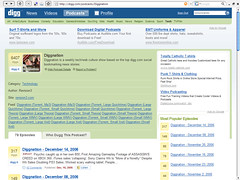
If you're not already a user of the fabulously popular user-generated social news site digg.com you're missing out. This week there has been a huge overhaul, making it much easier to customize the site to your liking. Whether you're interested in celebrity gossip or dorky Linux stuff, this is a great place to stay on top of the latest stories.
I'm also very impressed by the new Podcast section. I've used Odeo in the past, and I have to say that this is even easier. You can browse or search through podcasts by category, looking for the most dugg podcast. Then within that podcast you can jump right to the most dugg episode and listen to it right within your browser... very very smooth and seamless.
Become one with digg.
Tuesday, June 27, 2006
Handbrake for Linux

Well, I managed a while back to compile Handbrake for Ubuntu (Dapper Drake). It was a pain and I'm not sure many other people have it, so here is a binary if you're interested.
I've also been working on a GTK front-end using the uber-easy zenity. It's not very good yet, but its a start.
Sunday, June 18, 2006
Please, don't print at home

I know it, you just love the convenience of printing at home on your inkjet printer. Its so fast, so easy, so affordable. Except for... it's not.
Printing at home is like buying the Salisbury Steak frozen dinner at the grocery store. In the end it cost more and was much lower quality than what you would have gotten from the professionals - but you're willing to pay for the convenience of being able to eat the meal (or make the print) in your underpants.
My exposure to home printing is admittedly limited, however nearly every time I look at what my father has printed I look upon it unfavorably. This is the worst one I have seen, so I had to snag it and scan it in. This was not a print that I pulled out of the trash can mind you, this was actually leaned up against a picture frame for people to view and enjoy.
Those of you who have met Stacey and I in person will note that we have many less magenta stripes in real life than in this print. Our shadows are less purple, eyes are less red, and our teeth are less blue.
Printing services from on-line printshops like Kodak or Shutterfly boast great quality at a low price (around 15 cents for a 4x6). Even brick and mortar stores like Wal-Mart and Cosco offer quality printing solutions for your digital prints for less money than printing at home.
One solution could be for Cosco to allow you to shop in your underpants. Another would be to bite the bullet and point, click, and enjoy quality prints rushed to your door for pennies (yes, UPS delivers even if you're in your underpants). Or you could always print yourself and show a snapshot like this to your friends at work.
Wednesday, April 12, 2006
Too Common
So I turned on my Windows XP machine. It's so sweet since I got my GeForce 7900 and I overclocked my Pentium D. I've got it all set up with Spybot Search and Destroy, Microsoft Defender, and Ad Aware and I also run Norton Anti-Virus so I know I'm safe. Anyway, so I was looking for a way to get the latest version of Dreamweaver 8. I got it a few times in the past, but I never really got around to making a web page, but hopefully this new version will motivate me. Anyway, so you know that junk is mad expensive right - man. So I was talking to a friend of my uncle, and he was like "oh man, I could get that for you, I'll burn you a CD". So like he burned me this CD and I went to install it, but for some reason whenever I'd double click on setup.exe nothing would happen, but then I couldn't right-click until I rebooted. I figured that was probably just a wack version, so I fired up my trusty Internet Explorer. Oh, as a quick tangent - I totally have my IE hooked up sweet. I got these popup blockers from my ISP and I followed these instructions on how to disable ActiveX - but actually I normally turn that back on cuz I need it for Windows update and also for some reason I can't play some Windows Media files on some web pages without it. So right - like I'm in IE and I do a search for Kazaa Lite using MSN search. Kazaa lite is the good version to use because the main version has crazy spyware stuff. From the search I actually ended up finding a few more programs that I tried out for P2P... like 6 of them. My system tray down by my clock is so funny, cuz each time I install a program it puts an icon down in the system tray. Most of those are so the programs will run quicker, but it's so hilarious you know because I really don't run any of those. Anyway, Windows XP rocks because it hides those icons, and the unused icons on my desktop from old installs. Actually, all those installs put tons of stuff in my start menu. So I totally got the new google desktop search. It helps me find some of those programs I couldn't find otherwise. I dunno man, its like even though I have a fast machine I really need to do another re-install of Windows, you know, because it gets all crufty after a while. I haven't re-installed in probably like 4 months, but I normally try to do it every three - for some reason when I run Word it becomes full-screen, has no toolbars, and doesn't let me close it - so you know it's time for a re-install. So I was going to go get Dreamweaver once I got all my P2P apps installed, but then I ended up playing some World of Warcraft. My druid has got mad skillz yo. I totally met this chick on there that digs me.
Monday, March 6, 2006
Backslash
And now it is time for your ASCII lesson of the day.
This, /, is a slash. You may recognize this character from our friend http://, pronounced aych tee tee pee colon slash slash. When in doubt, its a slash.
This, \, is a backslash. You'll know it from nothing other than archaic microsoft command-line stuff. You'll never use it unless you are a programmer or love the impotent Windows command-line interface.
This, /, is a slash. You may recognize this character from our friend http://, pronounced aych tee tee pee colon slash slash. When in doubt, its a slash.
This, \, is a backslash. You'll know it from nothing other than archaic microsoft command-line stuff. You'll never use it unless you are a programmer or love the impotent Windows command-line interface.
Tuesday, February 7, 2006
Blockbuster iCal
For those out there in Internet-land like me who switched from Netflix to Blockbuster, you may miss your RSS feeds that you had with Netflix. Well, I like iCal, so I made a script that'll look through an MBOX folder and create an .ics file from the emails that Blockbuster sends. Here it is if you are interested.
Wednesday, February 1, 2006
WordPress 2.0
Well, as you will hopefully not notice I have upgraded to WordPress 2.0. Since I had forcefully (and probably stupidly) hacked the bejesus out of 1.5 to do what I wished it took me more than a few minutes to get this up and running. The best features of WordPress 2.0 are in the management interface. A much better wysiwyg posting interface with a kick-ass preview pane. It looks like categories are much easier, allowing you to add an arbitrary number of categories to a post (like tags). Maybe I'll actually start using the categories now. The K2 theme for WordPress 2.0 looks to be a pretty solid framework for people wanting a theme with ajax capabilities. I'll dig a bit more into that later.
Monday, December 5, 2005
Google Calendar expected 12/6
To me, Google is perhaps the only entity with enough push to be able to bring useful calendaring to the masses. Although most people are simply unconcerned with calendaring, if Google can make coordination very simple for families, teams, and community groups, it may become a more useful lifestyle tool for Joe Schmo. Obviously I'm hoping for iCalendar, RSS, and an open API to complement their offering - and if they could murder eVite along the way I wouldn't complain.
As the title says!
read more | digg story
Tuesday, November 29, 2005
Bits and Bytes
Lesson of the day
People I talk to quite frequently use the words "bit" and "byte" interchangably. So many people in fact that I feel like it's time for a simple lesson.
A byte is made up of eight bits. A bit is one-eighth of a byte. A megabyte is eight times larger than a megabit. A gigabyte is eight times larger than a gigabit. See the pattern?
A T1 is 1.544 megaBITS per second. Your cable modem at home has a downstream of around 3 megaBITS per second. Your hard drive in your home computer is 60 gigaBYTES.
When you downloaded the latest .NET framework from Microsoft, you didn't get a download speed of 20K... K is not a speed; kilobytes per second is a speed. Using K as a unit of speed is like if someone asked me how tall I am, and I responded 20K - I'm sure I'm 20K something tall, but it's useless information.
This just in, an inch is different than a foot.
People I talk to quite frequently use the words "bit" and "byte" interchangably. So many people in fact that I feel like it's time for a simple lesson.
A byte is made up of eight bits. A bit is one-eighth of a byte. A megabyte is eight times larger than a megabit. A gigabyte is eight times larger than a gigabit. See the pattern?
A T1 is 1.544 megaBITS per second. Your cable modem at home has a downstream of around 3 megaBITS per second. Your hard drive in your home computer is 60 gigaBYTES.
When you downloaded the latest .NET framework from Microsoft, you didn't get a download speed of 20K... K is not a speed; kilobytes per second is a speed. Using K as a unit of speed is like if someone asked me how tall I am, and I responded 20K - I'm sure I'm 20K something tall, but it's useless information.
This just in, an inch is different than a foot.
Wednesday, November 2, 2005
HOW TO: Setup & Tweak RoundCube AJAX Webmail On Your Server
Finally, a respectable webmail client that is forward looking. For years I have run Squirrelmail and their "thou shalt not use javascript or style sheets - yet frames are okay" mentality is frankly retarded. Their saving grace was that IMP and other webmail clients sucked much harder. With the complete lack of innovation from Hotmail and Yahoo, there was little reason to be innovative - but gmail has pushed that. Enter RoundCube... be sure to check out the demo.
read more | digg story
RoundCube, a �browser-based multilingual IMAP client with an application-like user interface,� is the latest and greatest webmail client. The interface is the stunning with lots of AJAX magic as well as user configurable via XHTML and CSS 2 skinning. I love RoundCube so much, I�m declaring it better than Gmail.
read more | digg story
Tuesday, October 25, 2005
Front Row

A couple weeks ago Apple released new iMac G5s, and along with it a new piece of software called Front Row. Although mac enthusiasts have been clamoring for media center software for some time, the announcement did not excite many. Nobody wants to shell out $1,299 - $1,699 just to be able to watch downloaded TV, listen to iTunes music, and view their iPhoto galleries on a G5 screen. This simplified interface needs to be available on your TV.
Predictably, the software was pulled off of the iMac and made to run on machines it was for which it was not intended. To my delightment, this hacked version became available on bittorrent last night. Without the remote control which is included with the iMac G5, the functionality of Front Row was somewhat limited. I had to use the escape and arrow keys to move around the menus, but it was still nice to see the interface and play around with the movie trailers.
After mostly moving over to Stacey's place, I had been without dual monitors until I hooked up my G5 to her TV. We had been kicking off movies with the ol' double click until tonight.
Tonight, I found over on the Salling Clicker forum a nice little script that lets me use my cell phone to control Front Row... exactly what I was looking for. Even though I had pretty similar interface with my XBox, this is a really nice touch.
Subscribe to:
Posts (Atom)