Showing posts with label Computer. Show all posts

Wednesday, March 3, 2010

Silverlight

Oh Microsoft - you so craaaazy! Trying to install Silverlight 3 on an Intel Mac I am told that Silverlight 2 cannot be installed on a PPC Mac, now that's quality assurance.

[caption id="attachment_395" align="alignnone" width="508" caption="Silverlight 3 install attempt on an Intel Mac."]you so crazy[/caption]

Friday, February 26, 2010

Usability Matters: synergy2

Synergy2 is the newest addition to my server fail list. Despite its relatively short configuration file, it is filled with ways to screw up the configuration. Most times I have set it up I have made use of --debug on both the client and server, with a twist of tcpdump here and there. Having this many gotchas and necessitating that I reread an entire server and client man page and tutorial to get it working is unacceptable and I give a big fat thumbs up to would be competition (what happened to you Mango Lassi?).

Synergy2 is in good company however. There are plenty of other services I feel are inappropriately difficult to coerce into doing relatively simple things - I'm lookin' at you apache, sendmail, and procmail.

Saturday, February 20, 2010

n2n, peer to peer tunneling for people who want to get things done

I needed a remote connectivity solution that didn't suck. I am not a corporation. I am not supporting road warriors, secure extranets, and I don't need to be buzzword compliant. I just needed to connect together the machines that I work on without all the difficulty.

This solution needed the following features:

  • works on any flavor of Linux/BSD/OS X, and Windows too

  • open source

  • layer 2 to make printing, file sharing, DAAP stuff easier

  • reasonably easy to set up

  • gratis

  • actively developed

  • peer-to-peer - hairpin routing through a central concentrator is bad


One of the problems was that I would always start looking into a solution like OpenVPN, OpenS/WAN, PPTP server built into DD-WRT - but I always got distracted by more interesting projects. They just were not easy enough to make it worth while - dynamic DNS and ssh was my methadone.

Then I found out about Hamachi, a peer-to-peer layer 2 vpn solution that really did "just work" the way I wanted. The rad thing was it sorta worked like SIP with a STUN server - not really sure if it used UDP, but it didn't really matter. Connections were brokered through a Hamachi server, but the data flow was peer-to-peer. It worked great for all my machines through NAT and was cross platform. I used it for several months and now I had a taste for what good remote connectivity could be. There were some shortcomings though - it was not open source, and after it was purchased by LogMeIn it looked like development stopped. Bummer, but at least it was free and still worked.

After quite a while searching for an open source peer-to-peer style NAT piercing VPN solution I stumbled upon N2N, software that was super similar to Hamachi but open and from the good people at NTOP (have used NTOP and fProbe in the past - cool). Within ten minutes I had downloaded, compiled, and configured it and was absolutely blown away at the ease of use. I tried it out on OS X and Windows and it worked - hallelujah. One thing that might be a bit of a challenge for some folks is that you do need a server with a static IP to run the supernode on, but to me this was much better than relying on Hamachi for STUN type stuff (since they occasionally had outages for their free service).

Basically you just set up the supernode on a server on any UDP port you desire. It brokers the connections and then the traffic flows peer-to-peer over UDP. Here is the absolutely KILLER feature (which may be more of a side effect than feature) of using this connectionless UDP stuff - I can rip out the rug from underneath it and it still works. Lets say I have five terminal sessions going and I have been working off my 3G card in the car. Then I get home and Network Manager picks up the WiFi and flips over to that. N2N couldn't care less, all those connections within the tunnel stay up and working. Good luck doing that with an SSH or ipsec connection. No messing with keepalives - it really does work better than expected. For touch-and-go connectivity like mobile broadband, a solution that kills all your work and requires a reconnect just isn't going to cut it. Oh, and I can suspend and wake my machine without needing to reconnect.

I have probably been using it for about a year and have never run across anyone else who uses it and wanted to give it some props. It fills in the Hamachi requirement gaps for me and I give it my big fat seal of approval.

Tuesday, February 2, 2010

Modzilla

After years of being stoked about all things Mozilla and being a regular reader of mozillazine, it just dawned on me that people say Modzilla because they are taking Godzilla and replacing the G with an M. I had just put it in the same category as "exspecially" and "suposubly".

Saturday, January 23, 2010

mutt

Figuring out how to remap the default keybindings of mutt is easier than figuring out how to get it to use my local postfix daemon... this should not be difficult.

Sunday, March 15, 2009

Secure WiFi?

Let me just throw this question out there - even if I sound like a crazy. Why do you secure your WiFi? I like to fancy myself as someone nerdy enough to understand network security, but I don't necessarily understand the pragmatic reasons behind having a tightly secured wireless network. I suspect that most people secure their wireless network just because that is what they are supposed to do rather than having specific rationalizations.

Reasons secure WiFi is a good idea, and why you should not care

People would steal my bandwidth
How about being nice to your neighbors and paying it forward a little bit. In the days of 20Mb/s Internet connections are you really going to notice when the next door neighbor who can't afford their own connection wants to check the weather or look up a recipe? It would be foolish for someone to hop on your connection and then peg your bandwidth by seeding all their movies on Bittorrent - they would be noticed. If you do notice it is trivial to just cut them off.

People could use my connection for nefarious purposes and I'd be on the hook
Sure, they could use your connection for something bad, but how likely is this in reality. The ice cream man down the street that likes to browse some of the most repulsive pornography known to man is more likely to use TOR or a few select proxy servers then to drive to the front of your house to use your WiFi. If my neighbors had their WiFi open as I do then if my Internet connection were to go down while I was working at home I could pop onto another network and keep working without trouble. I this this use case is far more likely. There is also plausible deniability that goes along with being neighborly and leaving your connection open. Should you find yourself facing a civil suit from motion picture or recording industry it is perfectly reasonable to say that this traffic could have originated outside the walls of your home.

The neighbors could sniff and see where I am browsing
Yup, the neighbors could sniff all your non-secure connections. After setting up a sniffer they will see what sites you frequent and who you are talking to on insecure IM conversations... just like everyone else in the path of the TCP connection can do. Look, if you want to be secure and you're not using end-to-end security like TLS/SSL then you're not really secure anyway. Your ISP can sniff as well. Most people I see use WEP anyhow, which as I understand is completely broken. The type of person that would want to sniff your traffic is the type of person that can go to lengths to crack your WEP... use WPA2 if you have a stalker and insist on using insecure protocols for information you want protected.

My Windows computer could be owned
It already is.

Why your security is annoying

When friends come to your house with their iPhone or laptop, now you need to search around for what your password is - which you have about even odds of having lost. You probably won't remember if you're using WEP, WPA, WPA2 or whether you have a 64 bit or 128 bit ASCII or HEX password. If you're using a password worth a damn then it's going to be near impossible to type that into an iPhone. Maybe you've only set up "don't broadcast ESSID" and implemented MAC address filtering. A tcpdump and a couple minutes later and I could get on your network anyhow.

Saturday, November 24, 2007

Trying to Actually Use Ubuntu

It has been a couple weeks since I switched to Ubuntu on my Macbook. It's one thing to use Linux at work, but using it at home as a replacement to OS X has brought up new challenges. At home I like to watch and rip movies, listen to music and manage my iPod, manage my pictures and upload them to Flickr, and share all these things between the computers in my house. Mostly, things are going well, but it can be hard to figure out what actually works and what is a waste of time.

Hardware

Before even addressing software issues, I needed to get the hardware working. For the most part all of my hardware just worked. The special keys on my Apple keyboard even worked for changing the volume.volume changing
I was able to mount my HFS+ formatted firewire drives and my FAT32 formatted USB drive from work with no problems. An all too typical search through the Ubuntu forums gave me the necessary configurations to get my bluetooth mighty mouse and wacom tablet working. I even got my iSight built-in camera working with a Photobooth-like application called Cheese. Unfortunately, this was another trip to the web to figure out how to get this going.
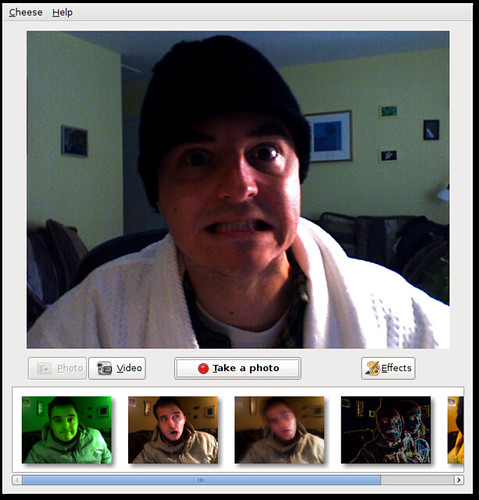
Cheese
Surprisingly my Apple remote control just worked with Totem and Rhythmbox, I may get back to that though and do some customization. With Xorg we are finally moving toward being able to configure X without needing to edit xorg.conf. In many situations all the necessary configuration will be auto-detected and "just work" but in my case, trying to run an external monitor only, the GUI tools actually just botched my xorg.conf - and I didn't have a good way to revert other than my backup I had made on the command line. Really I'm not so sure that the GUI configuration is as good as even Windows 98. After some xorg.conf battles I was able to get my external 24" Dell monitor working beautifully at 1920x1200. Still, I look forward to these tools getting better in the future with true "bullet proof" X.

Music and Podcasts

There are a buhjillion applications you can use to manage your music and podcasts in Linux and none of them can hold a candle to iTunes. The big four are probably Rhythmbox, Amarok, Banshee, and XMMS. I immediately discount XMMS and it's 1996 stylings - this is really equivalent to the first version of WinAMP ever. At work I've been using Rhythmbox, mainly because it doesn't choke and crash when importing some of the more dodgy tracks in my 16-thousand-deep music library. Amarok doesn't coke either, but it is so bulky and impossible to figure out - it's like the emacs of music world. Add to that the fact that it's KDE based and doesn't seem to support all the features I want without configuration and its a non-starter for me. Both Rhythmbox and Banshee have nice DAAP support, so I can share my music on my home network. Unfortunately neither can read from an iTunes share because Apple made iTunes incompatible. I can get around this with the Firefly DAAP server on the Mac. Banshee shares also seem to be unreadable on iTunes, but Rhythmbox shares are perfectly readable. After all of this I think I have settled on Banshee.
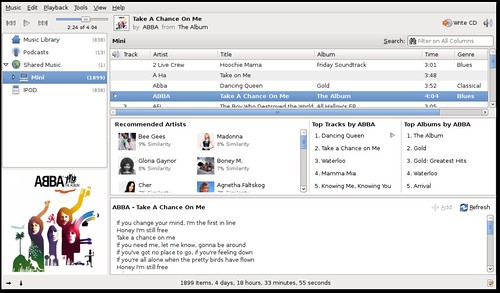
Banshee Music Player As you can see here, Rhythmbox looks pretty darn similar and would be comfortable to anyone who is used to iTunes. Rhythmbox
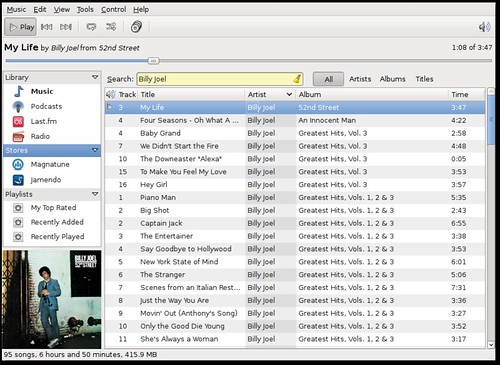
One of the big things I love about Rhythmbox is the half-broken lyrics plugin that can grab lyrics from the web. After digging around I managed to find a similar plugin for Banshee that actually works much better. Banshee can grab podcasts for me and sync with my iPod, but good luck if you have a small iPod and want to sync only certain playlists or files. Fortunately the Banshee folks have a roadmap that I think puts them in the right direction. They are reworking the iPod support, and will be adding new features like a play queue - a feature I love in Rhythmbox and wish that iTunes had as well. Banshee does a great job with album art and giving me recommendations of other music. Last.fm support is also there for audioscrobbling (sharing what I've been listening to with others). I think this is a great tie into the social web and someplace that I hope iTunes goes as well. Of course, Banshee is just a music player, so for my video podcasts I need to go elsewhere. Of course it can burn a CD and rip music and all that other shit I'll never do.

Sound is beyond terrible on Linux. Acronym soup will confuse the hell out of you and ultimately the solution is to just pray that it works. To make the volume control on the keyboard work the way I want I had to go into the sound applet and control select two items - that worked, but who the hell can actually figure this out. OSS, ALSA, blah blah blah. It's far too confusing. PulseAudio is the latest buzz, but I still betcha sound is going to be confusing as hell.
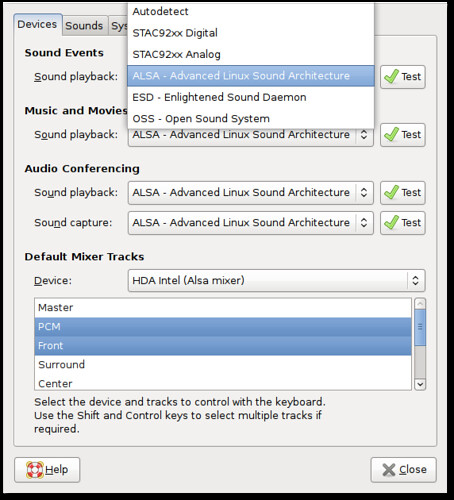
Sound Configuration

Video

Ok, so there are a few things I do with video. I watch video podcasts, I rip DVDs, and I just watch the ripped or downloaded movies. iTunes was nearly worthless for this. The restricted codecs manager makes it fairly easy to get the right codecs. The only problem is that by default Totem, the built in movie player, uses the gstreamer back-end. I'm not sure why, but for highly compressed video there is no post-processing on by default. This wasted hours of my time looking for a solution. I managed to fix it without replacing the gstreamer back-end with xine, but I don't know how I did it. For some reason every video engine tries to use XV. I don't know, or care what XV is, but with my Intel video card I need to figure out how to switch everything to X11. Scrubbing through videos also bites with Totem - not necessarily worse than Quicktime though. I prefer Gnome-Mplayer which has beautiful post-processing and scrubs through beautifully so it's easy to get back to where you were or scrub back to see something you missed. I also like the fact that with both mplayer and totem that I can strip them down to a nearly interfaceless window. On the mac I used NicePlayer for this same purpose.

For ripping movies I use Handbrake. Some dude finally put together a good GTK based front-end for Handbrake which seems to work well enough.
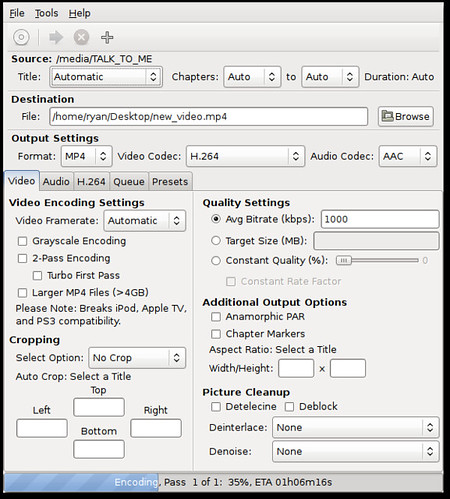
Handbrake
Not too much to say beyond that - it just works.

My video podcast client of choice is Miro, which is kinda like an open-source Joost. The cool thing is that it can do torrent based rss streams, so I can get real tv using tvRSS or something like it. It is not perfect, but it seems to work well enough, better than iTunes anyway.

Also, Nautilus is great at giving me information about a video and showing fun little keyframes. Check it out.
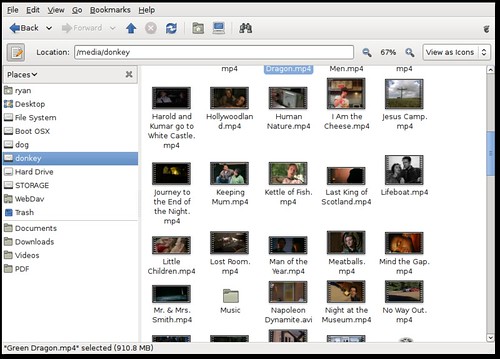
Nautilus File Manager

Photos and Graphics

I have not finished testing this all out, but right now f-spot is working well. It indexes all my pictures without choking on its own vomit like iPhoto sometimes did with my library. It works with my Canon raw format, and can launch Gimp for more advanced stuff. I still need to recreate all my albums though. It's much faster than iPhoto, but certainly is not as fancy and pretty. I can send my pics right out to Flickr without any trouble - it just works. Here's a shot of it.
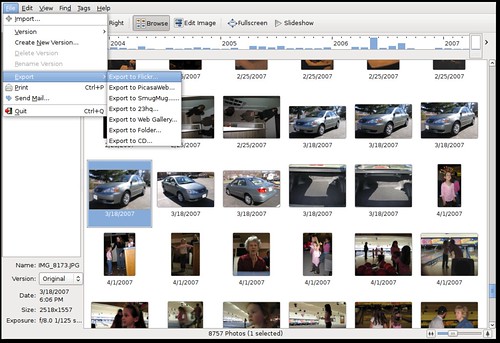
F-Spot I almost don't care so much about albums on my local computer - that's mostly for sharing and I can manage them well enough on Flickr. The big thing for me is being able to import easily, do small tweaks, and get them up on the web without much effort. F-Spot wins in that regard.

Desktop Search

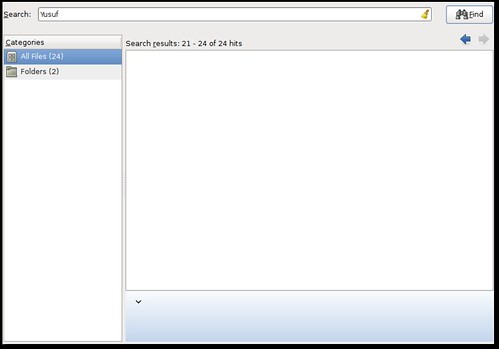
Ok, desktop search still sorta sucks balls on Ubuntu. On Tiger, spotlight sucked as well - slow and unreliable. Leopard however flips that on its head - so I sure hope there is some rapid development on the Tracker front (the default indexing tool in Gutsy). Deskbar is a nice quicksilver-like launcher I use. It is a plugin based search bar, so it can do things like look up words in the dictionary, launch applications, or search with Tracker. The only problem is that Tracker just plain doesn't work reliably for me. It flips out and either returns no results when I know there should be results, or it somehow thinks all my images are great results for just about every word I type. I don't see a lot of utilities built in to troubleshoot either. Anyhow, here are the screenshots.
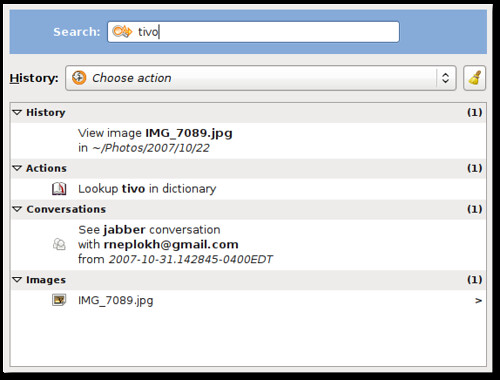
Deskbar
Crapper - err I mean Tracker

Other Stuff

So here are some other things.

Pidgin rocks, but it still has a long way to go with features. Of course voice and video are the most requested, but for those who want VoIP there is a built-in softphone called Ekiga. Pidgin works with every protocol, and can sync in some ways with the Evolution address book. I can tweak it just how I like, to be small and out of the way.
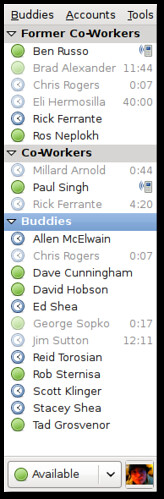
Pidgin

I'd really like to see more zeroconf stuff in the Linux desktop. After some tweaking and installing of tools I have a great view into DAAP shares, ssh services, and Bonjour printers on my network - but the integration could go a lot further.
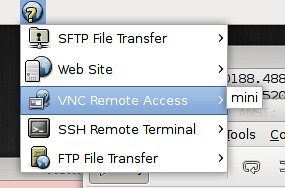
Bonjour

Maybe the best thing that Ubuntu has over OS X is central management of all my software updates. It's easy to find new software, install it, and upgrade it. This is just the way it should be. I usually use Synaptic, which is the more advanced software install tool.
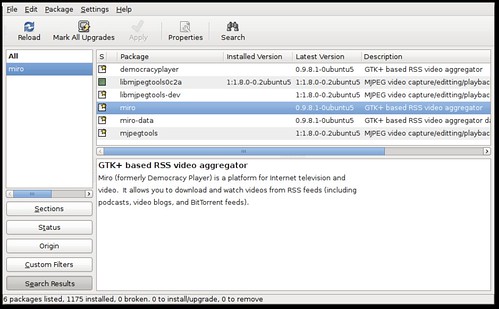
Synaptic

On OS X, iSync is so so close, yet so far away. Conduit is a very raw and new tool (meaning buggy as all get out) that can sync the stuff you're interested in, like photos and notes and all that. It is actually working for me right now, but it's really a manual process rather than syncing when a device is connected or on a schedule.
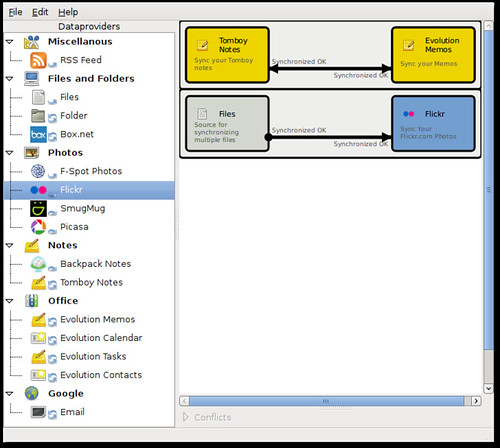
Conduit

Evolution, the calendar, contacts, and mail client in Gnome, is feature rich, but buggy as hell. I'm still sorta surprised this was included with Gnome when it was. Web calendars seem to work great - even integrating with the clock. The contacts manager though seems to flake out way too easily. I'm trying to submit bugs where I can.

That's about it really. There are plenty of problems, but most I have been able to overcome. I really think Linux can become an easier solution than Windows or OS X in the future, and I hope the community and distributors continue to focus on ease of use. I don't have any show-stoppers so far, so I'm pleased.

Friday, August 31, 2007

iPhoto '08 Still Sucks

iphoto memory leak
Yeah, it's still unusable and I am officially looking for an alternative after maybe six years of using iPhoto for all my photo management needs. If I want to stick with the mac, I'm thinking that Aperture is my only real alternative. I don't believe the integration with the iPod, iMovie, and iDVD works the same way with Aperture though which is a bummer - not to mention the price tag. I tried out f-spot on Ubuntu Linux and although it's a little more light on features, it does nearly everything I'd like to do. Of course, picassa from google is one possibility, but easy uploading to flickr is a requirement for me.

I've gone through the obvious steps to try and breathe life back into iPhoto. I've blown away all my preferences. I've repaired permissions. I've even done the super secret command-option start and had iPhoto rebuild the entire library and all thumbnails. I've got a somewhat big iPhoto library - almost 10,000 pictures, but should that really matter? I store my library on an external HFS+ formatted firewire 7200rpm drive... could that be a problem? I have maybe 100 albums. These all seem reasonable to me.

On the plus side, I actually can run iPhoto now. It still locks up my computer, takes gigabytes of memory, and crashes constantly (I have been able to work with it for almost 15 minutes before a crash though). Poop. I tried just opening iPhoto and patiently watching Activity Monitor. The real memory usage eventually grows to over 1.5GB and the virtual memory creeps to over 2.5GB and iPhoto just crashes hard. Under disk activity I see 6MB/sec being written pretty consistently - which seems to correlate with the virtual memory creep I suppose.

Saturday, August 25, 2007

iPhoto '08 - Events, but you can't Crop


For the most part I am a big promoter of all things Apple. They continue to innovate and build great products. Apple has made my life easier many times in the past and for that I thank them. All evidence so far points to iPhoto '08 being completely unusable.

My photo needs are meager. Crop, rotate, a twist of brightness or color enhancement - combined with the ability to share with friends and family on Flickr make me happy. Unfortunately, iPhoto '08 can't crop on my machine and I don't know what I'm going to do. I've got a macbook that is less than a year old. I of course maxed out the memory to 2GB. Just opening iPhoto and doing nothing takes up 318MB of memory. My CPU spikes up to 48% according to Activity Monitor without doing anything. All of this may be fine, but when I try to crop a picture, I now am presented with a box in the middle of my picture that I have to drag, resize, and move. When I drag the corners of this box, both CPUs spike up to 100% and the machine becomes laggy. If I need to resize this box one, two, or three times in a row, I need to wait for perhaps a full minute for this operation to complete. THIS IS NOT ACCEPTABLE. Grrr. I just opened iPhoto, flipped between events to photos (to see how many I have), then back to photos. Now iPhoto is pegged at using 70% of both cores. Again, I am doing nothing. I don't know what I am going to do. The new iMovie is designed so you can make a video in a snap. How about focusing on cropping a photo in a snap. This is crazy.

Thursday, August 2, 2007

Bluetooth Mighty Mouse


Ok, quick opinions in no particular order. I got this mouse because my old Logitech got all jumpy on my desk and drove me insane.

Uncomfortable.
Looks great and matches my macbook.
Side buttons impossible to actually push (but who really cares).
The trackball is kinda silly and not too natural.
It tracks well on my desk.
The preference pane gives no acceleration option - only a slow to fast slider for tracking.
Expensive.

Wednesday, July 18, 2007

Firefox 3...

I tried out the latest alpha build - and wow. It renders much faster and the SVG rendering is soooo much faster. Thank god.

Tuesday, July 3, 2007

Hi, My Name is Jonathan Schwartz

The CEO of Sun is the official winner of the Muppethouse "CEOs That Deserve Wedgies" award. Congrats Mr. Schwartz.

Saturday, February 17, 2007

MacFuse - everything looks like a file system

Ok, so you go to your Documents folder on your mac. There you put all your fun Word documents. You are familiar with moving around and organizing your files into folders, then opening with Word. Maybe you've seen Google docs, but it didn't matter to you since you like to deal with your documents the way you're accustomed. Enter MacFuse and DocFS. Now you can have a folder on your Mac that is sort of like a little portal into Google docs. Double click, create new files, delete files, open in Word - the difference is that when you're at work or a friend's house now you can get to your docs on Google. Free and easy backup.

So you have all these pictures that you organize into a folder structure and thats how you like to work with them. Picassa web and Flickr are just confusing. Enter PicassawebFS and Fuse.

RSS Feeds as a file system. Gmail as a file system. An LDAP directory as a file system. Anything as a file system. That's what FUSE is all about. This is seriously badass and Google has released this early version of FUSE for the Mac (which has been popular on Linux for a year or two).

Watch this video and become one with MacFuse.

Friday, February 9, 2007

Cricket

Cricket Graph

So I've been messing with cricket a bit for monitoring interesting SNMP bits and bobs.

You'll find some basic documentation on getting Cricket up and running, but I felt overall that it could be significantly improved. That said, I'd just like to offer a few notes that took me way too long to figure out.

If you've got a UCD-SNMP host and you want to build a targets file automagically, take a look at the ~/cricket/util/systemPerfConf.pl script to build that stuff for you - it'll save you a lot of time.

You can just add folders to your heart's content within ~/cricket-config, but the poller isn't going to grab those top level folders i.e. router-interfaces unless they're listed in ~/cricket/subtree-sets. I have no idea why they need to be listed here.

Expect the sample config trees in ~/cricket/sample-config to have problems - ~/cricket-logs/normal.0 is your friend.

For grapher.cgi, get a stylesheet going, because that interfaces is ugly. You'll probably have to hack on grapher.cgi to add in some id's or classes. Get ready to see some ugly html hard coded colors - uuuuuugly.

Speaking of hacking on grapher.cgi, the search that shows up at the bottom of the grapher is pretty useless unless you put in attribute=value pairs such as display-name=SERVER1. It really is that ghetto, but this post gives a little hint at how to fix it.

Saturday, December 16, 2006

Lenovo Rock On


x60


I just recently got a Lenovo X60 as my new work laptop. It has been a number of years since I have had a thinkpad, but I have to say that I'm quite impressed. This is an ultraportable machine, much like the 12" iBook I had a few years ago. Having a super tiny laptop that you can tote around the house and just open quickly, check a web page, then close quickly, is quite a luxury. Both this laptop and my Macbook have integrated Intel video chips, which I have to say I am quite impressed with. I haven't tried any high-end 3d games or anything, but it does everything I want it to do. I installed Ubuntu Edgy on there and everything just worked, including 3d graphics, wireless networking, sleep, special keyboard buttons, and hibernate. The battery in this puppy will go for around six hours, which completely changes the way I work with the machine. My eMachine craptop lasts probably a couple hours, but I rush to plug it in whenever I get home. With the thinkpad, maybe I'll plug it in this weekend... or maybe not. That's all, just wanted to give a quick thumbs up to this machine.

Friday, October 6, 2006

Favorite Key

A mac keyboard is funny. It has F14, F15, and F16 keys... that is unless you're on a notebook computer in which case they've admitted that those keys are useless. On the flip side - the keyboard contains home and end keys, which for some godawful reason just plain don't work (unless you're using a Microsoft product). My suggestion - get rid of the F14, F15, and F16 keys and actually make home and end work.

A typical PC keybard is not without its gems. The red-headed step-children of the keyboard are in exile in the upper right hand - SysRq, Scroll Lock, and Pause. Then you've got the Num Lock - couldn't we have gotten rid of this once all keyboards had arrow keys built-in. Does anyone ever NOT want num lock on? I like how it's so strange to have num-lock on, that it warrants a little LED light to tell you that its on - just like caps lock. My suggestion, get rid of the arrows on the number keys and subsequently number lock - then turn the step-children keys into ctrl-alt-delete to make life easier on Windows.

Monday, August 7, 2006

Work Friendly


workfriendly

Originally uploaded by patrix99.


Check this out. For those of you who have a boss that likes to pop into your office randomly, this is your solution. Browse within a masqueraded MS Office 2003 interface. Are you filling out your status report or browsing the latest furry forum? Now you can browse without fear of discovery. I love the Internet.

Sunday, July 16, 2006

Less expensive, but good enough?

I'm thinking about switching over to a Xen hosting solution over at GPLHost. It's a virtual machine but probably pretty fast. It'd save me about $50/month, which would be great. I'm nervous about migrating muppethouse to a new server. Its always such a pain in the ass. Just a thought.

Sunday, June 18, 2006

Please, don't print at home


badprint

Originally uploaded by ryanmshea.


I know it, you just love the convenience of printing at home on your inkjet printer. Its so fast, so easy, so affordable. Except for... it's not.

Printing at home is like buying the Salisbury Steak frozen dinner at the grocery store. In the end it cost more and was much lower quality than what you would have gotten from the professionals - but you're willing to pay for the convenience of being able to eat the meal (or make the print) in your underpants.

My exposure to home printing is admittedly limited, however nearly every time I look at what my father has printed I look upon it unfavorably. This is the worst one I have seen, so I had to snag it and scan it in. This was not a print that I pulled out of the trash can mind you, this was actually leaned up against a picture frame for people to view and enjoy.

Those of you who have met Stacey and I in person will note that we have many less magenta stripes in real life than in this print. Our shadows are less purple, eyes are less red, and our teeth are less blue.

Printing services from on-line printshops like Kodak or Shutterfly boast great quality at a low price (around 15 cents for a 4x6). Even brick and mortar stores like Wal-Mart and Cosco offer quality printing solutions for your digital prints for less money than printing at home.

One solution could be for Cosco to allow you to shop in your underpants. Another would be to bite the bullet and point, click, and enjoy quality prints rushed to your door for pennies (yes, UPS delivers even if you're in your underpants). Or you could always print yourself and show a snapshot like this to your friends at work.

Sunday, March 26, 2006

Move over Bacon


Rotation

Originally uploaded by ryanmshea.


There are people out there that put away their 12 sided dice just long enough to perform benchmarks on disparate computing platforms. They test floating point operations, 3d gaming frame-rates, and if they're feeing particularly pragmatic, office productivity metrics. One thing they've never quite been able to measure well is FUN.

I know there are plenty of people out there that punch their time card, sit at a desk for eight hours, then go home - never caring in the least whether they enjoyed their computing time. Not me, I actually like working on computers that do fun things. If my computer took three times as long to open an Excel spreadsheet, had half the Quake 4 frame-rates, but I never yelled at it in frustration and smiled every once in a while at its coolness - my friends, that would be the computer for me (disclaimer - I don't use Office Productivity applications or play 3d games).

OS X has had a corner on the market for fun computing for quite a while. The lack of spyware and viruses is just a bonus. Now, my happy dual G5 has taken a back seat in the fun department to my wonderfully beautiful Linux desktop. Thanks to my new hero David Reveman over at Novell, the next generation of Linux desktops will be chock full of eye candy - or as many would say "useless eye candy". Those that say that of course find no utility in fun... they also roll 12-sided die, shower infrequently, and the closest they've been to a woman is watching reruns of the Golden Girls.

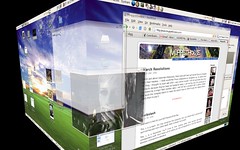
I've got virtual desktops that are finally usable. I've got kick-ass ways to switch between applications, both with a cool alt-tab function and with the Expose'-done-right knockoff feature. Lets not forget the true transparencies and crazy zoom accessabilty feature. Thanks to all these features (and wobbly jello windows) I can interact with my computing environment in a much more organic way. I love it. Get Ubuntu, use it, become one with it.