
Showing posts with label Phone. Show all posts
Showing posts with label Phone. Show all posts
Tuesday, June 17, 2008
Math is Hard, Even For My Phone
Yesterday I needed to do a quick calculation and my phone calculator was the most convenient tool. Little did I know that along with the crippled bluetooth, USB, and phone charger capabilities Verizon Wireless had also crippled the calculator. I was trying to put 6 billion into the calculator, but as soon as I put in the ninth digit I got INPUT ERROR across my screen. Can you hear me now? Motorola V3c from Verizon Wireless, give it a shot.

Sunday, January 6, 2008
Just a Phone?

Imagine if you will a mobile handset that is truly only a phone. Really just a phone - no camera, it cannot play movies or MP3s, and the ringtones are horrid. Motorola has targeted low-end market with their Motofone F3. Our carriers select their phone roster based on what will entice underinformed buyers to jump carriers. If phone users actually had to shell out the up front cash for a phone rather than relying on carrier subsidies I bet we'd have a wide range of phones that do exactly what people want. That said, this Motorola phone is what I want. With a focus on emerging markets like Brazil and India Motorola has created a phone with no bloat. Its battery lasts a couple weeks on standby, the reception is great, has very good call quality, and the kicker is that mine weighed in at $42 after shipping - unlocked and without any contract of course. The screen uses eInk technology rather than a traditional LCD. This means it is easy to read in the direct sunlight and uses no power unless it is changing. There will be no splashing dolphin screen saver for this phone, just a 1983 calculator feel. I just got this bad boy this weekend, but after seeing how much better the reception is at my parents house I am already impressed. The only place to get this phone is the Internet, as Motorola does not distribute it in the US or Canada. If you are afflicted with bouts of rage from a Windows Mobile "SmartPhone", I'd recommend picking up an a phone that is a phone like the F3.
Friday, November 23, 2007
Have a Phone, But No Numbers
So I have this Windows Mobile phone which I need for work. It is fabulously unreliable, so I got a replacement... a new fabulously unreliable phone. Anyhow, I've got contacts... friends, family, all that. It appears that Windows Mobile doesn't know how to work with a vcard. You need to use ActiveSync on Windows to get contacts over to it. I was using MarkSpace Missing Sync for Windows Mobile - but then I upgraded to Leopard, and I'd need to upgrade to a newer beta version for god knows how much (as a short aside, I can't imagine how terrible a beta version of this software would be, since the final version 3 barely worked). I tried to get syncing working in Linux with SynCE, but that was a no-go.
So here I am, empty phone, vcard, and a computer freshly booted up into Windows XP. I open up the address book application and import my vcard with all my contacts. This just about freezes my computer, but after an hour of clicking to confirm each card I had my contacts loaded. I then fire up ActiveSync. I check the check box that I would like to sync my address book - and the icon has a little icon just like the built-in address book application. It syncs - yet I have no contacts. It turns out that you need to use Outlook to sync. ActiveSync never really said that. Ok, so I try to export the contacts from Address Book over to Outlook because I had just cleaned them up. They have a little tool to do the export. Unfortunately since my account is set up for exchange, the transfer fails. I then tried to export my newly cleaned up Address Book as a vcard. Sorry - you can only create a vcard out of one contact at a time. So then I export to the other format - WAP, which I assume is Windows Address Book. Yeah, but unfortunately Outlook can't read those. Ok, so then I try to just go back to the original vcard and import that into Outlook. Even though the Windows Address book can read the vcard and import them (albeit very slowly), Outlook ONLY reads the first contact out of the vcard.
The point is that even when you try to do everything the Microsoft way, you are screwed. This is why they suck. Not because they are evil. Not because Bill Gates is a weenie. They will fail because they are often times a poor technology company that lacks any insight into what people want to do with their computers.
So here I am, empty phone, vcard, and a computer freshly booted up into Windows XP. I open up the address book application and import my vcard with all my contacts. This just about freezes my computer, but after an hour of clicking to confirm each card I had my contacts loaded. I then fire up ActiveSync. I check the check box that I would like to sync my address book - and the icon has a little icon just like the built-in address book application. It syncs - yet I have no contacts. It turns out that you need to use Outlook to sync. ActiveSync never really said that. Ok, so I try to export the contacts from Address Book over to Outlook because I had just cleaned them up. They have a little tool to do the export. Unfortunately since my account is set up for exchange, the transfer fails. I then tried to export my newly cleaned up Address Book as a vcard. Sorry - you can only create a vcard out of one contact at a time. So then I export to the other format - WAP, which I assume is Windows Address Book. Yeah, but unfortunately Outlook can't read those. Ok, so then I try to just go back to the original vcard and import that into Outlook. Even though the Windows Address book can read the vcard and import them (albeit very slowly), Outlook ONLY reads the first contact out of the vcard.
The point is that even when you try to do everything the Microsoft way, you are screwed. This is why they suck. Not because they are evil. Not because Bill Gates is a weenie. They will fail because they are often times a poor technology company that lacks any insight into what people want to do with their computers.
Wednesday, January 25, 2006
Cingular Rebate ...or... How I Learned to Stop Worrying and Get My Money
Theory
Today I contunue to stand on my customer advocacy soapbox. My rant-of-the-week is about mail-in rebates. At this point the rebate marketing trend has been around long enough to have touched the lives of nearly every American consumer. The idea is simple, bank on the laziness of the masses to allow you to advertize dramatic price savings which will only be realized by the most vigalent of penny-pinchers. In and of itself, I have no problem with wealth transfer from the lazy (or as some people might put it - the "smart enough to not work their ass off for a dozen hours for a lousy $20") to the diligent. What I do have a problem with is the dishonest dirty trickery of the whole process. Ambiguous verbiage and long waits are put in place by professionals to strategically minimize the payout from the third-party rebate clearing houses. Today's discussion will focus on Cingular Wireless.
Cingular
Because Cingular chooses to promote their phones with the post-rebate prices I would like to call them out on this process and hopefully share some tips along the way.
Today I contunue to stand on my customer advocacy soapbox. My rant-of-the-week is about mail-in rebates. At this point the rebate marketing trend has been around long enough to have touched the lives of nearly every American consumer. The idea is simple, bank on the laziness of the masses to allow you to advertize dramatic price savings which will only be realized by the most vigalent of penny-pinchers. In and of itself, I have no problem with wealth transfer from the lazy (or as some people might put it - the "smart enough to not work their ass off for a dozen hours for a lousy $20") to the diligent. What I do have a problem with is the dishonest dirty trickery of the whole process. Ambiguous verbiage and long waits are put in place by professionals to strategically minimize the payout from the third-party rebate clearing houses. Today's discussion will focus on Cingular Wireless.
Cingular
Because Cingular chooses to promote their phones with the post-rebate prices I would like to call them out on this process and hopefully share some tips along the way.
Wednesday, January 4, 2006
Goodbye T-Mobile, It's Hard to Go
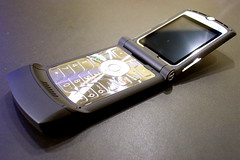
Ohh yeah RAZR. After being worn down by horrible coverage from T-Mobile and the draw of sexy phones like the black Motorola Razr V3, I made the switch to Cingular.
One thing that was driving me nuts about this Razr was the Cingular logo on the external LCD whenever you make a call. It reminds me of the obnoxious dealer license plate frames or CARMAX stickers. After a couple hours figuring it out, I got that hacked now and it's got a purty picture of Stacey.
Thursday, September 15, 2005
(Insert Wireless Carrier) Sucks!

Although the blogosphere is bursting with dissenting opinions about just about everything, there seems to be a particular hatred for mobile phone providers. Cingular, T-Mobile, Verizon, and Sprint all have their advantages and quirks, but for the most part the decision comes down to who do you hate the least.
I have a particularly strong bond with my hard-earned dollars and don't separate myself from them easily. Combine this with an affinity for shiny new fancypants phones, dislike of talking on the phone, and disdain for long contracts and it's not too hard to figure out why I'm on T-Mobile.
The problem of course with T-Mobile is that I'd probably get better coverage with a couple tin cans and a really long string. Since I have no contract at this point, on and off for the past year I've been searching for a new provider that could allow me to make and receive calls. Painfully I decided that with a $150 rebate from Amazon, Cingular would be the way to go. I'd get a new Motorola Razr V3 to play with and I'd only be paying around $10 more each month for a network that actually works (or so I hear).
Unfortunately when my phone arrived and I read the documentation on number portability I found that porting a number to Cingular would make me ineligible for the mail-in rebate from Amazon, meaning I'd have to pay $150 and sign up for a 2-year contract at $10 more each month just to be able to have a wireless network that functions. It was tough to do, but after fruitlessly pleading with the Cingular sales folks to give me a deal in order to keep my business, I decided that the phone would go back.
Damnit T-Mobile - you suck major ass, but you suck ass less for me than others. Sure, you have no network time sync... and sure I get notified about voicemail about 4 days after I get one... but you save me money at least and I have no contract.
Tuesday, February 15, 2005
Amazing Happenings in Geek
I get excited about seemingly random things. However, I like to think that the projects, objects, designs, and software I get excited about often become important (at least to me) rather than slowly fading into oblivion. I seem to be juggling several chunks of excitement lately, so it will help to share.
I have always had a bit of envy for those artistic people that are able to produce amazing designs. I have a short attention span, which is not always a bad thing, but it often turns large projects into non-starters. For me, artistic excitement has consistently come back to a dorky topic, SVG. The program most frequently used for this by design artists is Adobe Illustrator. Visio, Fireworks and Flash all lay out vector graphics - but the way of the future is the W3C standard. The same folks that bring you "html" and "xml" now bring you "svg" - this will be a component of the next version of Windows (Longhorn) and could potentially overtake Flash as the dominant SVG web delivery mechanism in the long run. Inkscape is a great tool for designing SVG. I bottled my apple wine this weekend and I am just finishing up my labels in Inkscape - I highly recommend you give it a shot.
Asterisk development is still going strong. After much trial and error I now have both Voicepulse and Broadvoice working with IAX and SIP respectively. The Asterisk related quest I have been on lately though has been to obtain a vintage red ITT or Western Electric touch-tone red phone. It's all about the missle launch feeling when I pick up the handset. Once my number portability is completed my Asterisk implementation will begin to stabilize.

On American Idol all of the contestants want to be role models for the youth of America. Kelly, Ruben, and Fantasia have not made it onto my rold model list yet, but I have recently appended my idol list. Nat Friedman, co-founder of Ximian (now Novell), now sits on my list next to John Stossel and Bill Reichel (my mortgage lender). Who are your idols?
Flickr. Learn it, use it, become one with it. I was searching for a solution to manage all of my 3500 digital photos. After playing with Gallery and realizing its limitations I began searching for a tool that would better suit my needs. I discovered an iPhoto export tool for Flickr, an open API with perl bindings, and yes - a Wordpress gallery plugin. Now I can store all of my full-res images on someone elses server. Go flickr. By the way, check out the company that runs flickr, ludicorp.
I have always had a bit of envy for those artistic people that are able to produce amazing designs. I have a short attention span, which is not always a bad thing, but it often turns large projects into non-starters. For me, artistic excitement has consistently come back to a dorky topic, SVG. The program most frequently used for this by design artists is Adobe Illustrator. Visio, Fireworks and Flash all lay out vector graphics - but the way of the future is the W3C standard. The same folks that bring you "html" and "xml" now bring you "svg" - this will be a component of the next version of Windows (Longhorn) and could potentially overtake Flash as the dominant SVG web delivery mechanism in the long run. Inkscape is a great tool for designing SVG. I bottled my apple wine this weekend and I am just finishing up my labels in Inkscape - I highly recommend you give it a shot.
Asterisk development is still going strong. After much trial and error I now have both Voicepulse and Broadvoice working with IAX and SIP respectively. The Asterisk related quest I have been on lately though has been to obtain a vintage red ITT or Western Electric touch-tone red phone. It's all about the missle launch feeling when I pick up the handset. Once my number portability is completed my Asterisk implementation will begin to stabilize.
On American Idol all of the contestants want to be role models for the youth of America. Kelly, Ruben, and Fantasia have not made it onto my rold model list yet, but I have recently appended my idol list. Nat Friedman, co-founder of Ximian (now Novell), now sits on my list next to John Stossel and Bill Reichel (my mortgage lender). Who are your idols?
Flickr. Learn it, use it, become one with it. I was searching for a solution to manage all of my 3500 digital photos. After playing with Gallery and realizing its limitations I began searching for a tool that would better suit my needs. I discovered an iPhoto export tool for Flickr, an open API with perl bindings, and yes - a Wordpress gallery plugin. Now I can store all of my full-res images on someone elses server. Go flickr. By the way, check out the company that runs flickr, ludicorp.
Wednesday, December 29, 2004
Photo Blog
I'm testing out a new photoblog thing. I can just take a picture with my phone, send it via bluetooth to my mac, then everything else just happens automatically. Easy is good.
Subscribe to:
Posts (Atom)